AI-powered video clipping
Turn Long Videos into
Viral Short Clips with AI
Podcasts, interviews, lectures, live streams, webinars — hours of great content that most people never see. Fast Video Clip turns them into short clips ready to post, in minutes.
- Free credits to get started
- No subscription, pay as you go
- Translate into 10 languages
Built for Anyone Who Talks on Camera
If you create long-form video content, you're leaving reach on the table.
PodcastersEducators & CoachesLive StreamersPublic SpeakersYouTubersWebinar HostsInterviewersContent Creators
How It Works
From raw recording to shareable clips in four steps.
- 1
Drop In Your Video
Upload any recording — a podcast episode, a live stream, a lecture, a webinar. However long it is.
- 2
We Create the Subtitles
Your speech is transcribed into accurate, timestamped subtitles. This is what powers everything next.
- 3
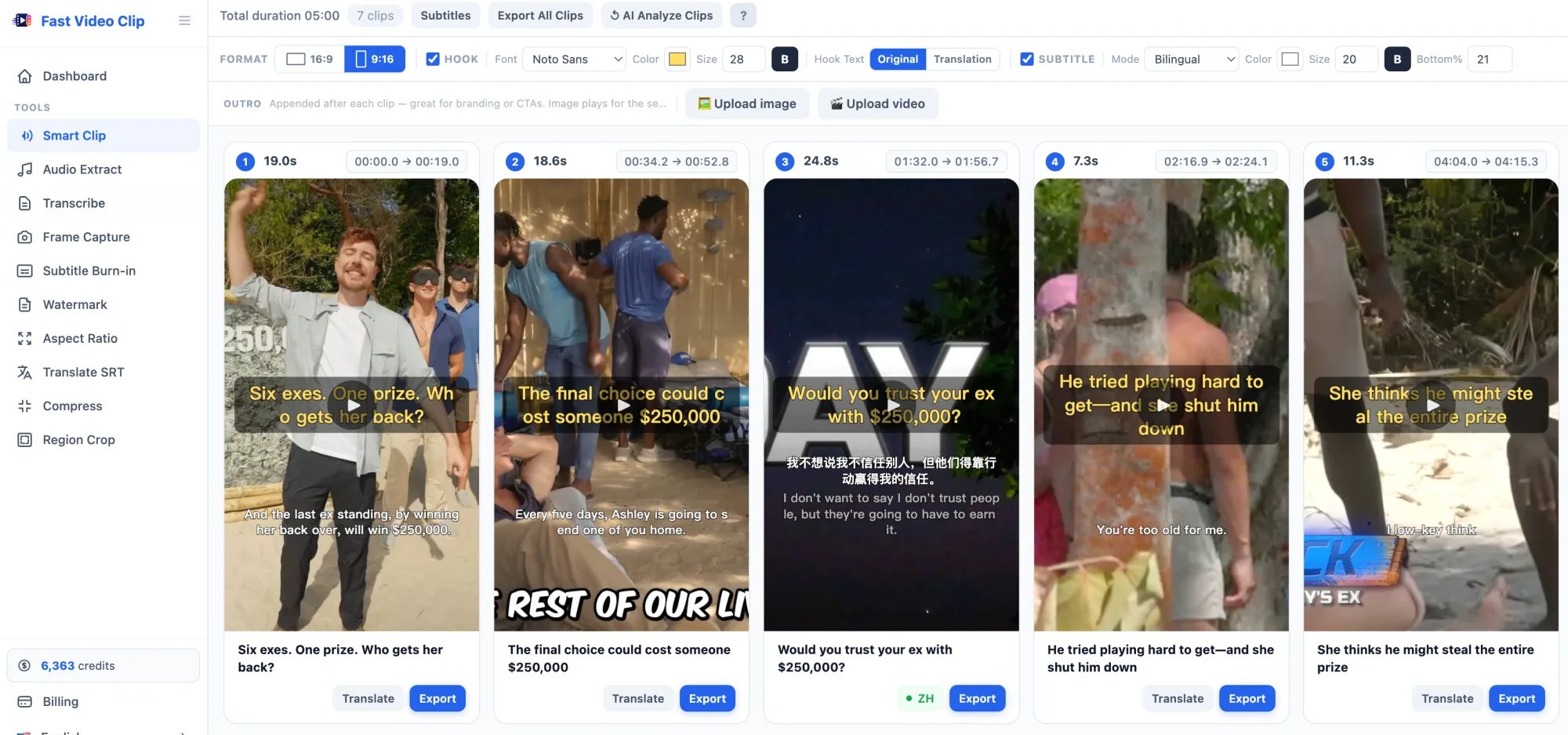
AI Finds the Best Moments
AI picks the most engaging segments and writes a hook for each one. You stay in control — edit, trim, or re-run the analysis.
- 4
Export and Post
Translate subtitles if you want, choose your format, and export. All clips are rendered and ready to upload.
What You Get
Everything you need to go from a long recording to a batch of polished, ready-to-post clips.
Hours of Work in Minutes
No more scrubbing through footage. AI reads your transcript and picks the most compelling moments for you.
Ready for Every Platform
Export vertical clips for TikTok, Reels and Shorts, or horizontal for YouTube — from the same source video.
Reach a Global Audience
Translate subtitles and hook text into 10 languages. Show both languages at once to connect with more viewers.
Hooks That Stop the Scroll
Each clip gets an AI-written hook overlaid on the first few seconds. Edit it to match your voice.
Your Brand, Your Style
Customize subtitle font, color, and size. Add a branded image or video outro to every clip automatically.
No Subscription Required
Buy credits and use them whenever you need. No monthly fees, no commitment. Pay only for transcription, AI analysis, and translation.
Multilingual subtitles
Transcribe, Translate, and Burn — in One Flow
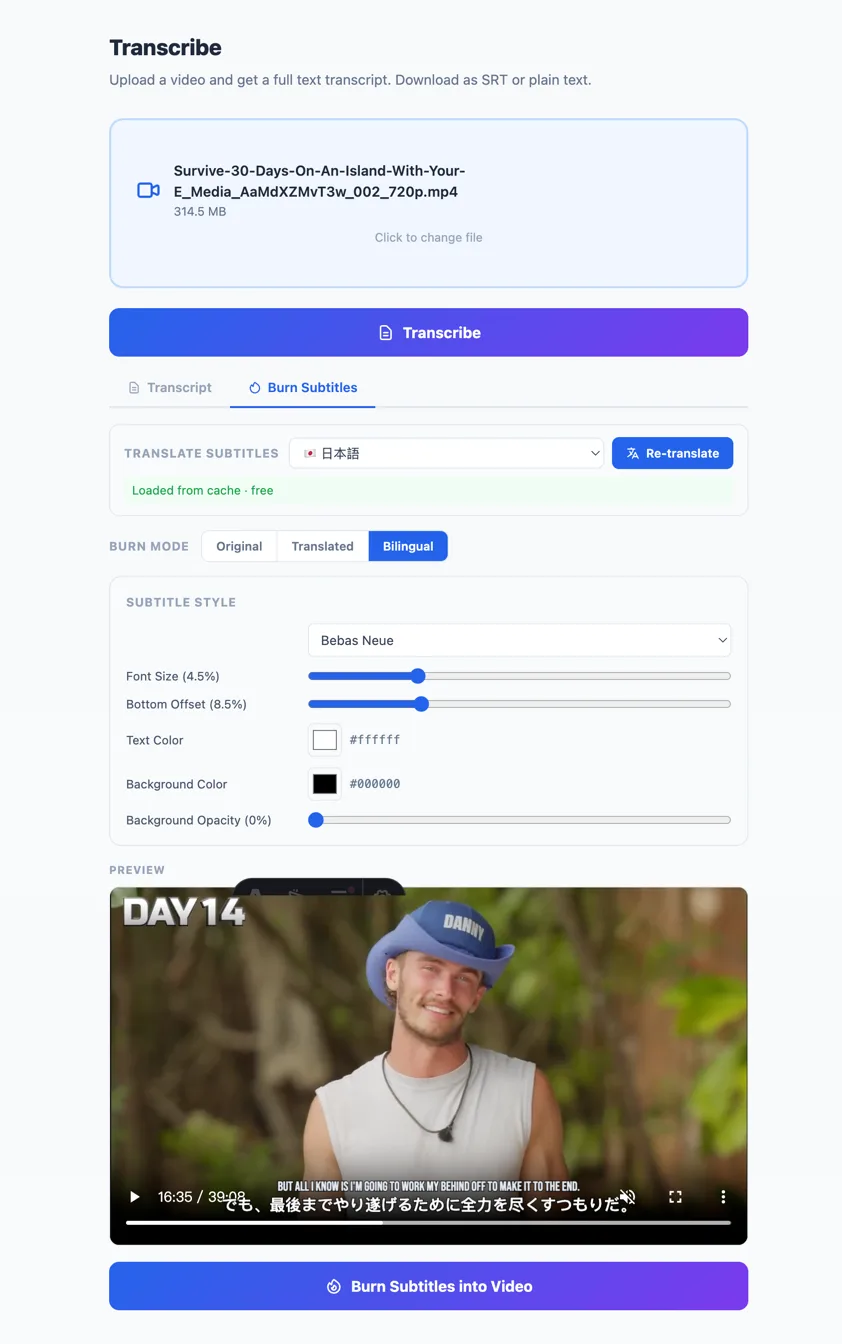
Upload your video, get an accurate transcript, translate it into any of 10 languages, then burn bilingual subtitles directly into the video. No third-party tools, no manual work.
- Accurate AI transcription with timestamps
- One-click translation into 10 languages
- Bilingual subtitles: original + translation stacked
- Download as SRT, bilingual SRT, or burn into MP4
More Tools, All Included
Beyond Smart Clip, you get a full suite of browser-based video tools — no extra software, no uploads to third parties.
All Free to Use All standalone tools are completely free — no credits needed. Only Smart Clip's AI features cost credits.
Pay Only for What You Use
No subscription. No monthly fees. Buy credits and use them whenever you need.
Export is always free — you only pay for transcription, AI analysis, and translation.
Frequently Asked Questions
How long does it take to process a video?
Uploading a short clip for the first time takes a minute or two. Once transcribed, AI analysis is near-instant. And if you upload the same video again, all your previous results are restored automatically.
Can I edit what the AI suggests?
Absolutely. You can edit the hook text, adjust clip start and end times, fix subtitle text, and re-run the AI analysis as many times as you want.
How does translation work?
Each clip's subtitles and hook text are translated together with one click. You can show the original, the translation, or both at the same time. Translated clips are saved so you never pay for the same translation twice.
What formats can I export?
All clips export as MP4. You choose portrait (9:16) for TikTok, Reels, and Shorts, or landscape (16:9) for YouTube and other platforms.
Does AI clipping actually work?
For talk-based video, yes. The AI reads the full transcript to find self-contained moments with a strong hook, and every cut is aligned to the transcript's line breaks so clips don't start or end mid-word. It works best for podcasts, interviews, lectures and streams — music or purely visual videos have little speech to analyze.
Do I have to upload my whole video?
No. Your video stays in your browser. Only a compressed audio track is uploaded for transcription — clips are cut, captioned and exported locally on your device.
Can I make AI clips for free?
Yes. New accounts get free credits to try transcription and AI clipping on your own videos. Exporting clips is always free and never adds a watermark.
How much does it cost?
Transcription is 1 credit per minute of video (60 credits/hour). AI analysis is 5 credits per segment (1 segment per 20 min, min 1). Translation is billed by character count. Export is always free. You only pay for what you actually use — no monthly fees.
Your Next Clip Is Already in That Recording
Stop letting great content go unseen. Turn it into clips people will actually watch.
Start Clipping